TIF 2026.2.0 Release Information
This release was published on 2026-06-24.
Job Monitors
The Job Monitor feature provides configurable monitoring of job activity originating from ENOVIA job queues or from inbound service listeners[*] such as JMS, RabbitMQ, or Directory Listener. Each monitor defines its own evaluation rules, threshold logic, and action set. Once the threshold is exceeded within a specified time window, the monitor executes one or more configured actions.
| [*] Limitation: The Job Monitor implementation currently does not support REST or SOAP Web services. We plan to consider adding support for these in future releases. |
The Job Monitor introduces a mechanism for detecting abnormal or excessive job activity across TIF services. Its key benefits include:
Early detection of abnormal job activity The monitor continuously observes job flow and can detect patterns such as:
-
Sudden spikes in job volume
-
Repeated failures
-
Stuck or looping integration jobs
-
Misconfigured upstream systems generating too many events
This enables proactive detection of issues before they impact downstream systems or users.
Automatic handling of problematic conditions When thresholds are exceeded, the monitor can perform automated corrective actions:
-
Stopping the problematic TIF queue or TIF service listener
-
Stopping a service causing excessive jobs
-
Logging messages
-
Sending email alerts
This reduces operational issues and prevents cascading failures.
Configuration example:
jobMonitor.mymonitor.description= My Job Monitor
jobMonitor.mymonitor.queueNames = myqueue,otherqueue*
jobMonitor.mymonitor.jobStatuses = completed,failed
jobMonitor.mymonitor.observationWindow = 60
jobMonitor.mymonitor.bufferCapacity = 100
jobMonitor.mymonitor.evaluationInterval = 10
jobMonitor.mymonitor.recoveryPeriod = 120
jobMonitor.mymonitor.threshold = 5
jobMonitor.mymonitor.actions = mail,stop,log,custom
jobMonitor.mymonitor.mail.to = test@technia.com
jobMonitor.mymonitor.customAction = com.acme.tif.monitor.MyAction
Please read more here how to configure monitors.
New Message Receiver API for JMS, RabbitMQ, Kafka and IBM MQ
This release introduces a new set of message receiver interfaces for JMS, RabbitMQ, Kafka and IBM MQ. The new APIs address limitations of the previous design and provide improved access to message processing context.
Overview
The new interface introduces a MessageContext abstraction, which encapsulates both the incoming message and the associated processing context. This enables richer interaction with the messaging system and simplifies future enhancements.
Key Improvements
-
Introduced a common
MessageContextinterface shared across JMS, RabbitMQ, Kafka and IBM MQ implementations -
Provided unified access to both message data and processing context through a single argument
-
Improved extensibility, allowing future enhancements without breaking existing APIs
-
Added support for creating child jobs directly from the message receiver
-
Introduced transport-specific
MessageContextimplementations for each messaging system
Example: RabbitMQ Message Receiver
The following example demonstrates how to implement a RabbitMQ message receiver using the new API:
package com.acme.tif.rabbitmq;

import com.technia.tif.enovia.messaging.ProcessingContext.AfterCompleteContext;
import com.technia.tif.enovia.rabbitmq.RabbitMQMessageContext;
import com.technia.tif.enovia.rabbitmq.RabbitMQMessageReceiver;
import com.technia.tif.enovia.rabbitmq.Result;

public class TestReceiver implements RabbitMQMessageReceiver {

    @Override
    public void onException(RabbitMQMessageContext ctx) {
        ctx.setResult(Result.NACK);
    }

    @Override
    public void onMessage(RabbitMQMessageContext ctx) throws Exception {
        String body = ctx.resolveMessageText();

        ctx.newChildJob()
            .immediate()
            .objectId("1.2.3.4")
            .jobCfg("tvc:jobcfg/PartBasic.xml")
            .param("myParam", "myValue")
            .create();

        ctx.setResult(Result.ACK);

        ctx.afterComplete(this::completeCallback);
    }

    private void completeCallback(AfterCompleteContext ctx) {
        UUID jobId = ctx.job().getJobId();
    }
}
Backward Compatibility
-
Existing receiver interfaces are retained and marked as deprecated
-
Existing integrations will continue to work without modification
However, it is recommended to migrate to the new APIs.
Migration Guidance
Users are encouraged to:
-
Implement the new receiver interfaces:
com.technia.tif.enovia.jms.JMSMessageReceiver
com.technia.tif.enovia.rabbitmq.RabbitMQMessageReceiver
com.technia.tif.enovia.kafka.KafkaMessageReceiver
com.technia.tif.enovia.nativemq.MQMessageReceiver
-
Replace direct message handling with
MessageContext -
Optionally utilize the new APIs for job creation and lifecycle callbacks
Legacy interfaces will be removed in a future major release.
Service-Specific History and Cleanser Settings Now Configurable via module.custom.properties
Added support for configuring service history settings through both the Admin UI and the module.custom.properties file. Settings defined in the Admin UI are saved in TIFDB, while values specified in the module.custom.properties file take precedences.
It is also possible to configure service‑specific deleteLimit and maxIterations settings for the job‑cleanser and payload‑cleanser maintenance tasks.
Examples:
# The service tvc:jobcfg/MyJob.xml keeps jobs for 25 days
serviceSetting.jobKeepDays.tvc\:jobcfg/MyJob.xml = 25

# The service tvc:jmslistener/OtherJob.xml will not store payloads
serviceSetting.storePayload.tvc\:jmslistener/OtherJob.xml = false

# The job-cleanser task uses a delete limit of 5000 items
# when deleting old jobs for the service tvc:restservice/MyService.xml
jobCleanser.deleteLimit.tvc\:restservice/MyService.xml = 5000

# The payload-cleanser task runs a maximum of 10 iterations
# for the service tvc:jobcfg/OtherJob.xml
payloadCleanser.maxIterations.tvc\:jobcfg/OtherJob.xml = 10
Please refer the module.properties file for additional configuration details.
Admin UI - Configuration Editor Upgrade
The configuration editor in the Admin UI has been replaced with a new editor. The update includes an updated text editor, search functionality, and a refreshed navigation panel.
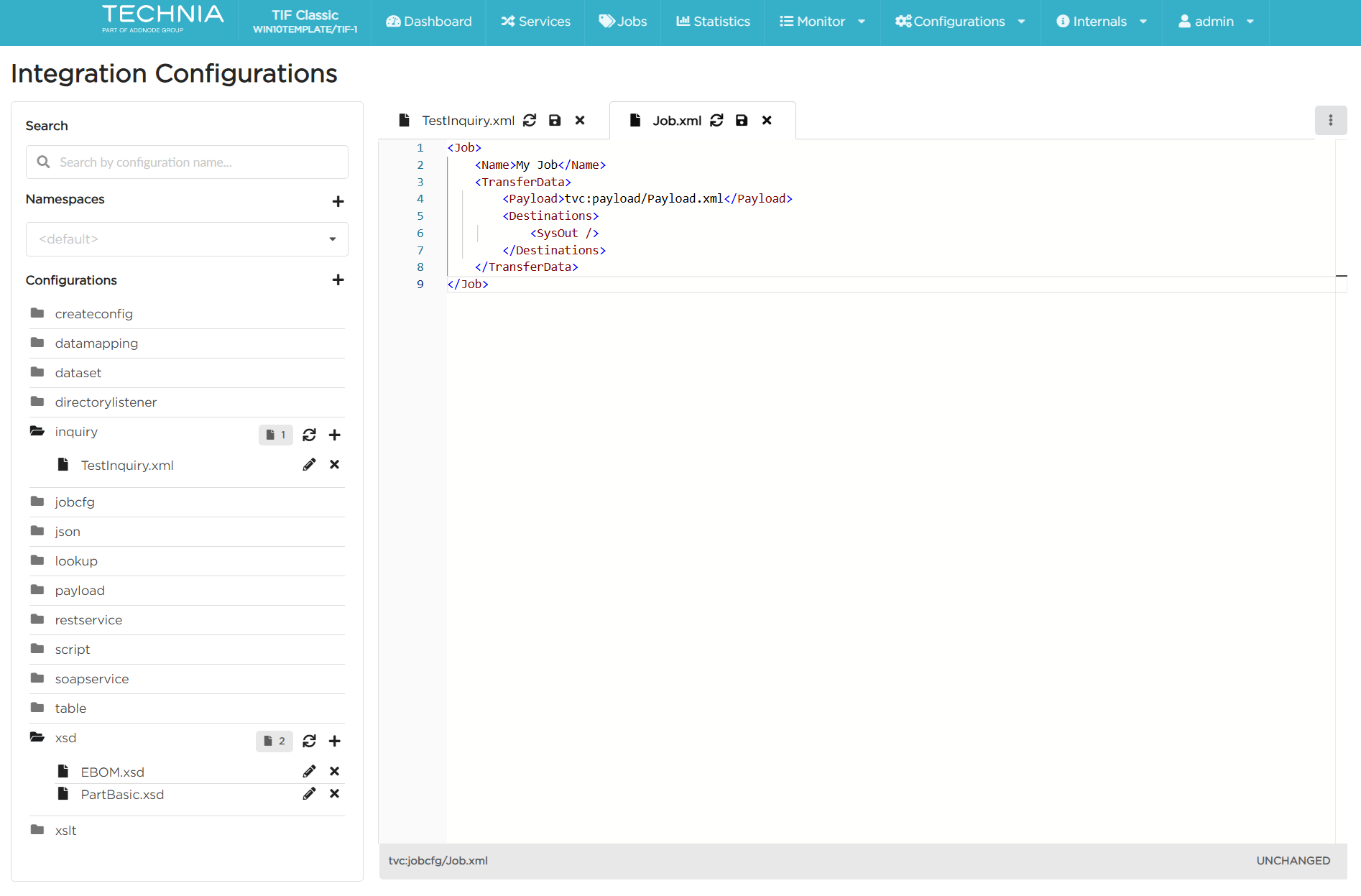
Cleanser Task for Deleted Job Transfers
A new automated cleanser task has been added to handle cleanup of files associated with deleted job transfer entities.
-
When a job transfer record is removed from the TIFDB, the cleanser task now automatically deletes any corresponding files on disk.
-
Prevents the accumulation of stale data.
The TIFDB schema has been updated to support the new cleanup logic.
|
On the first startup after upgrading to this release, the TIF server may take additional time while applying the database schema changes. |
To configure the task, refer to the settings in module.properties that use the deletedJobTransferCleanser. prefix.
Special Offline Cleanup Tasks
Two new maintenance tasks are available when starting the TIF server in
offline mode using -dbcleanup command line argument.
These offline tasks execute cleaning operations that are generally not required during normal system operation; however, they are beneficial in circumstances where, for example, the payload or transfer folder has grown in size and disk space is not being released as expected by the job-cleanser or payload-cleanser tasks.
The tasks are:
-
Transfer Folder Orphan Scan: Identifies files in the transfer folder that do not have corresponding records in TIFDB.
-
Payload Folder Orphan Scan: Detects orphaned payload files left behind due to missing or removed database metadata.
These tasks are intended for exceptional situations where the filesystem and TIFDB metadata are out of sync, such as manual file manipulation, interrupted operations, legacy inconsistencies and stale files remaining after deleted DB entries.
Both tasks:
-
Produce a detailed log file listing every processed file and its status.
-
A full log file is written into TIF’s temporary folder.
-
Deletes orphaned files when the setting
deleteis set true.
Recommendations:
-
Always run the tasks first with
deleteset false to review the summary of orphaned files before allowing deletion. -
It is strongly recommended to make a backup of the corresponding directory (payload or transfer) before running the tasks, especially if deletion is enabled.
To configure the tasks, refer to the settings in module.properties that use the offlinePayloadFileCleanser and offlineTransferFileCleanser prefix.
These tasks are disabled by default. To enable, set the enabled setting to true.
|
<NewJob> Event Handler — Change in Evaluator Invocation
The behavior of the optional job evaluator in NewJob event handlers has changed. If a job evaluator is configured, it is now invoked even when no object IDs are provided. In such cases, the evaluator receives null as the object ID.
Previously, the evaluator was only executed when object IDs were provided.
| If you use Java evaluator classes for jobs that don’t receive an object ID, make sure they can safely handle a null value. |
Support macros in Email Job Handler recipient address fields
Added macro support to the Email Job Handler’s recipient fields, enabling dynamic resolution of email addresses at runtime.
Multiple Admin Users Configuration
Support for creating and managing multiple admin users has been added via
module.custom.properties.
This enhancement allows defining multiple admin users with individual
attributes, credentials, and optional role assignments. When present, the
new configuration takes precedence over the legacy user.admin.* setting
while remaining backward compatible.
User entries are version-controlled to allow updates to be applied from the configuration file. Each user may define a version property that controls updates of existing users:
-
If a user does not exist, it is created.
-
If a user exists, it is updated only when the configured version is higher than the version stored in the database.
-
If
versionis not specified, it defaults to1.
When an existing user is updated, the following fields are applied:
-
First name
-
Last name
-
Email address
-
Roles
-
Locked status
The password property is optional.
-
For new users, if no password is configured, TIF sends an invitation email to activate the account and set an initial password.
-
For existing users, passwords are updated only when a version increase occurs.
-
A
resetPasswordflag may be set totrueto trigger a password reset email for an updated user (only whenpasswordis not defined).
The roles property is also optional. If no roles are specified, the user is
granted all available roles.
An optional locked flag can be used to control whether the user account
is locked.
See the file module.properties for more details on how to configure this
feature.
# User with encrypted password and all roles by default
user.admin.users.user1.name = michael
user.admin.users.user1.email = noreply@technia.com
user.admin.users.user1.password = enovia:=mpQVNa+2
user.admin.users.user1.firstName = Michael
user.admin.users.user1.lastName = Smith

# User without password (email-based activation)
user.admin.users.user2.name = emily
user.admin.users.user2.email = noreply@technia.com
user.admin.users.user2.firstName = Emily
user.admin.users.user2.lastName = Johnson
user.admin.users.user2.version = 2
user.admin.users.user2.roles = jdv, jde, se, aev, aee, jqv, jqe, siv, sie, sjv,
                              sje, icv, ice, sav, sae, uv, ue, atv, ate, pdv, pde
Fixed Bugs
Below is the list of fixed bugs as of this release.
| Issue No | Description |
|---|---|
1084 |
Error Creating Job on Empty Database |
1085 |
Fields Not Updated When Using Java File Modifier to Change Document Properties |
1092 |
Last Login Column Shows N/A for All Users on Users Screen |
1088 |
New Job Configurations Missing from Service Selection Dropdown on Create Job Screen in Admin UI (Dev Mode) |
1093 |
Admin UI Dashboard shows a blank screen when a user lacks the necessary role |