 TVC Classic - 2026.3.0
${ROOT_DIR}/tvc-action/navigate?pageConfig=My Config
Structure Browser - Administration Guide : Page Configurations
21 March 2016
1. Page Configuration Objects
A page configuration object acts as a container for common URL parameters that you can use to configure the look and feel of the Structure Browser page, hence this feature supplies an alternative way to configure the Structure Browser. Note that if you use this feature you will still have to configure some parameters on the URL as a page configuration object only supports the common URL parameters described in this section. For instance, you will still have to configure the URL parameter that points to the page configuration object that you intend to use.
The page configuration object format is described here .
1.1. Custom Parameters
Different use cases with the Structure Browser requires passing additional parameters,
these are typically defined within the <Parameters> section of the page configuration
instance OR defined as request parameters on the command/HREF that launches the Structure
Browser instance.
Example:
<PageConfig>
    ...
    <Parameters>
		<Parameter name="structureGUI" value="caret" />
		<Parameter name="evaluateExpandableNodes" value="true" />
		<Parameter name="persistentExpandState" value="true" />
		<Parameter name="navigationColumn" value="true" />
		<Parameter name="rearrange:column" value="FN" />
		<Parameter name="arrowKeyNavigation" value="true" />
		<Parameter name="portalMode" value="true" />
		<Parameter name="tableRenderer" value="com.technia.tvx.enc.render.EBOMTableRenderer" />
		<Parameter name="drag:enabled" value="true" />
		<Parameter name="drop:enabled" value="true" />
		<Parameter name="sidePanelMaximizeRealEstate" value="true" />
		<Parameter name="connection:type_Part:type_Part"value="relationship_EBOM,from,insert,Preliminary|Review|Create|Peer Review" />
		<Parameter name="connection:type_ECO:type_Part" value="relationship_AffectedItem,to,refreshrow" />
		<Parameter name="connection:type_ECR:type_Part" value="relationship_AffectedItem,to,refreshrow" />
		<Parameter name="connection:type_DOCUMENTS:type_Part" value="relationship_PartSpecification,from,insert" />
		<Parameter name="rearrange:column" value="FN" />
		<Parameter name="rearrange:dropenabled" value="false" />
		<Parameter name="renderTableRowActionsCombined" value="false" />
		<Parameter name="inCellEdit" value="true" />
		<Parameter name="finder" value="true" />
		<Parameter name="finder:openOnLoad" value="false" />
		<Parameter name="expand:selectionMaxLimit" value="5" />
		<Parameter name="entryProcessor" value="com.technia.tvx.enc.hierarchy.KindEntryProcessor" />
		<Parameter name="disableExpandOnLoad" value="true" />
	</Parameters>
If you provide a parameter within the request that initiated the Structure Browser instance, such parameter will have precedence over any parameter defined within the page configuration instance.
Example:
${ROOT_DIR}/tvc-action/navigate?pageConfig=tvc:pageconfig/MyPageConfig.xml&structureGUI=default
                                                                          ^^^^^^^^^^^^^^^^^^^^^
1.1.1. Portal Mode
The portalMode can be set to true if we want to remove the headers. It also adds an icon on the toolbar which opens current table in a popup window. It can be defined as below:-
<Parameter name="portalMode" value="true" />Default is false.
The below images show result when portal mode is enabled and disabled.
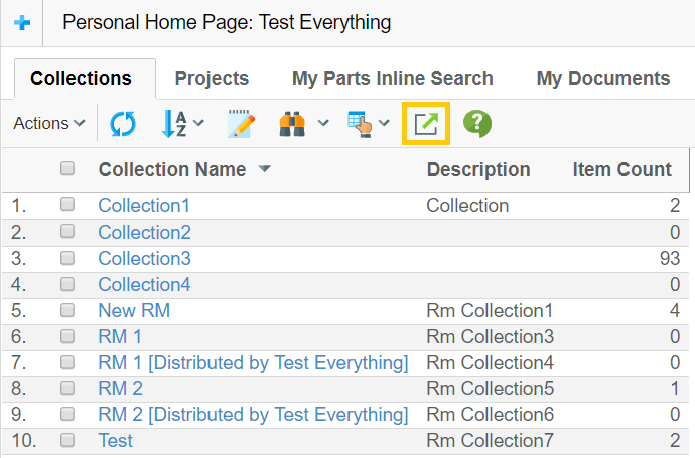
Figure 1. portalMode is true
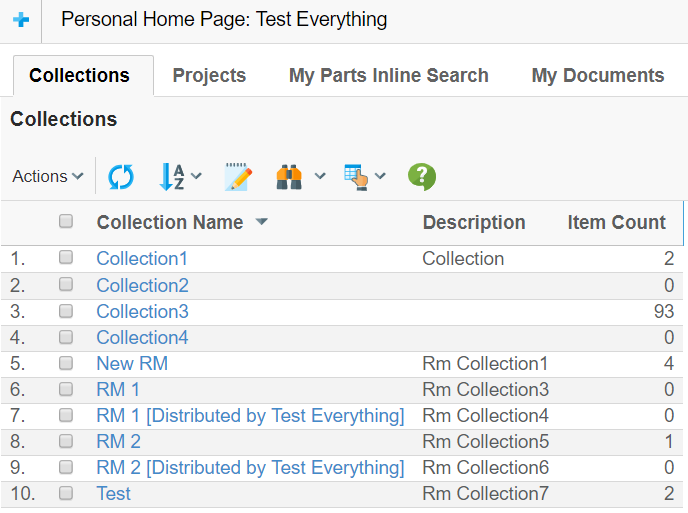
Figure 2. portalMode is false
1.2. Retain Selection Across Pages
When working with paginated tables, checkbox selections are normally lost when navigating between pages because the table content is reloaded. The <RetainSelection> element in the Page Configuration allows selections to be preserved across page changes.
When enabled, the selected rows are stored in the browser’s session storage. When the user navigates to another page and then returns, or when rows from a previous page appear on the current page, their checked state is automatically restored along with row highlighting.
1.2.1. Configuration
Add the <RetainSelection> element to your Page Configuration XML:
<PageConfiguration>
    ...
    <RowSelect>Multiple</RowSelect>
    <RetainSelection>TRUE</RetainSelection>
    ...
</PageConfiguration>| Value | Description |
|---|---|
TRUE |
Checkbox selections are retained across page navigation within the same browser session. |
FALSE |
Selections are cleared on page change. This is the default behavior. |
1.2.2. Behavior
-
While navigating to a new page, previously selected rows are retained and when navigated back to previous page, rows are automatically re-checked and highlighted.
-
When a form is submitted (e.g., a toolbar action), all cross-page selections are included in the form submission.
-
Selections are automatically cleared on refresh.
-
The feature works with both single and multiple row selection modes.
The <RowSelect> element must be set to Single or Multiple for selections to be visible. If <RowSelect> is not configured or set to None, there are no checkboxes to retain.
|